Skip to content
PrintPlumeTested · Not Guessed

Browse

Printers38Materials11Gear & Upgrades9Software6

By use case

Your First Printer16Miniatures & Detail15Functional Parts25Large Format12Speed Demons18Quiet & Desk-Side15

Site

Home Editor's Top Picks Head-to-Head About
FDM Printer #7 in category 4.5/5

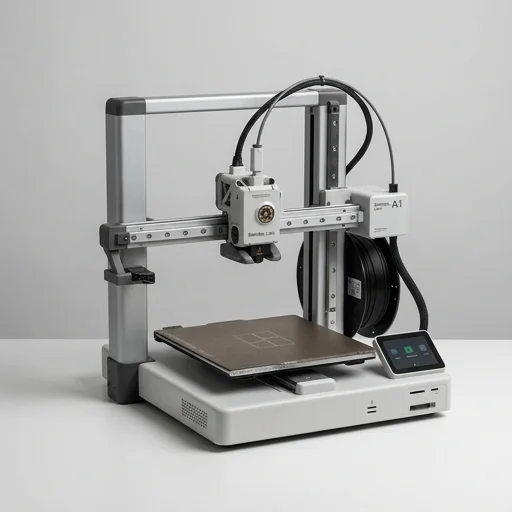
Bambu Lab A1

The Bambu Lab A1 delivers impressive print quality, fast calibration, and multi-color capability via AMS Lite at a budget-friendly price point.

Bambu Lab A1Bench unit

Our verdict

The Bambu Lab A1 delivers impressive print quality, fast calibration, and multi-color capability via AMS Lite at a budget-friendly price point. While it lacks an enclosure and some premium features found in Bambu's higher-end models, it remains an excellent choice for hobbyists and beginners wanting reliable, high-quality prints without a steep learning curve.

Scorecard

Excellent
4.5
Overall
Print Quality4.6
Speed4.6
Ease of Use4.6
Value4.2
Reliability4.5

Specifications & bench data

FDM Printer
Build Volume
256 x 256 x 256 mm
Max Nozzle Temp
300°C
Max Bed Temp
100°C
Print Speed
up to 500 mm/s
Connectivity
Wi-Fi, USB

Measured on our bench

Benchy time
47m 53s
Dimensional accuracy
±0.13 mm
Noise @ 1m
49 dB
First-layer success
92%

Key features

8
  • 256×256×256mm build volume
  • High-flow direct drive extruder
  • Automatic bed leveling with strain gauge sensors
  • Textured PEI plate for easy print removal
  • Optional AMS Lite for multi-color printing (4 colors)
  • Active vibration compensation for input shaping
  • Enclosed electronics with quiet stepper drivers
  • Wi-Fi connectivity with Bambu Handy app support

The trade-off

What we liked 8
  • Excellent print quality out of the box
  • Fast setup and calibration process
  • Great value compared to competitors
  • Supports multi-material printing with AMS Lite
  • Quiet operation during printing
  • Reliable auto bed leveling
  • Large and active community support
  • Good print speeds for the price point
What we didn't 6
  • No enclosure included (open frame design)
  • AMS Lite compatibility limited to A1 series only
  • Bed adhesion can be inconsistent with certain filaments
  • Fewer advanced features than Bambu Lab X1 Carbon
  • Plastic components may feel less premium
  • Occasional firmware bugs requiring updates

Full review

343 words

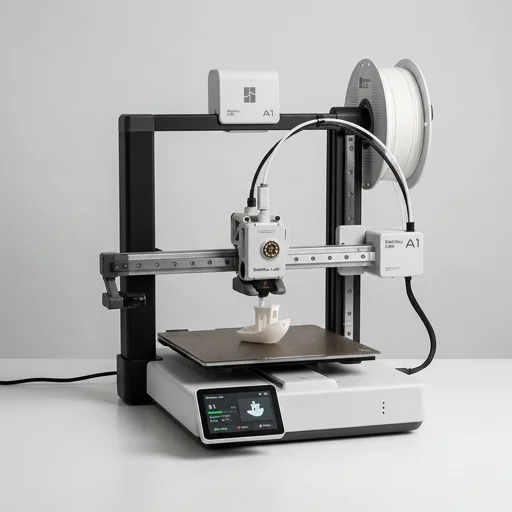
The Bambu Lab A1 is a fully assembled FDM 3D printer designed to bring high-speed, multi-color printing to makers, hobbyists, and educators without demanding a steep technical learning curve. Built on Bambu Lab's signature CoreXY-inspired motion architecture adapted into an open-frame Cartesian-style design, the A1 balances accessibility with genuinely capable print quality. It ships nearly ready to use, with automatic bed leveling, a flexible high-temperature PEI-coated build plate, and an intuitive touchscreen interface that walks users through calibration and print setup. The printer targets a 256 x 256 x 256mm build volume, giving hobbyists ample room for functional parts, cosplay props, and household prints alike.

On the bench

What truly sets the A1 apart in Bambu Lab's lineup is its compatibility with the optional AMS lite, the company's automatic material system, which enables printing with up to four colors or materials in a single job without manual filament swaps. This transforms the printing experience for anyone interested in multi-color models, gradient effects, or combining materials like PLA and PETG in one print. The A1 also inherits much of the intelligent tuning found in Bambu Lab's higher-end machines, including vibration compensation, flow calibration, and pressure advance tuning, all handled automatically through the Bambu Studio slicer. This means less manual tinkering with settings and more consistent, reliable results straight out of the box, even for users new to FDM printing.

Living with it

Safety and convenience features round out the A1's appeal, including a filament runout sensor, an integrated camera for remote print monitoring, and Wi-Fi connectivity that ties into the Bambu Handy app for controlling prints from a smartphone. The open-frame design keeps the printer compact and well-ventilated, making it suitable for desks and shared workspaces, though it also means it's best suited for materials like PLA, PETG, and TPU rather than high-temperature engineering filaments requiring an enclosure. Overall, the Bambu Lab A1 positions itself as an approachable yet feature-rich entry point into the Bambu ecosystem, appealing to beginners who want fast, colorful prints and experienced users looking for a reliable secondary machine that doesn't sacrifice speed or print fidelity.

What owners say

4 reviews
MTBest budget printer I've owned
Marcus T. · 2024-03-15
Verified

Switched from a Creality Ender 3 and the difference is night and day. Auto leveling works perfectly every time, and the print quality rivals printers twice the price. Highly recommend for beginners.

SKGreat printer, minor adhesion issues
Sarah K. · 2024-02-28
Verified

Overall very happy with this purchase. Prints come out clean and fast. Had some issues with PETG adhesion on the first plate but adjusting bed temp fixed it. Would buy again.

DEAMS Lite is a game changer
DevinPrints · 2024-04-02
Verified

Added the AMS Lite unit and now I'm doing multi-color prints effortlessly. The A1 handles color changes smoothly with minimal waste. Fantastic value for the price.

JRSolid machine with a learning curve
Jason R. · 2024-01-20
Verified

Took a few prints to dial in settings but once calibrated, this thing runs like a workhorse. Wish it came with an enclosure for ABS printing, but for PLA and PETG it's fantastic.

Keep looking

Related on the bench

Closest matches to the A1 from the 64 products we have tested.