Skip to content
PrintPlumeTested · Not Guessed

Browse

Printers38Materials11Gear & Upgrades9Software6

By use case

Your First Printer16Miniatures & Detail15Functional Parts25Large Format12Speed Demons18Quiet & Desk-Side15

Site

Home Editor's Top Picks Head-to-Head About
FDM Printer #1 in category 4.7/5

Bambu Lab X1 Carbon

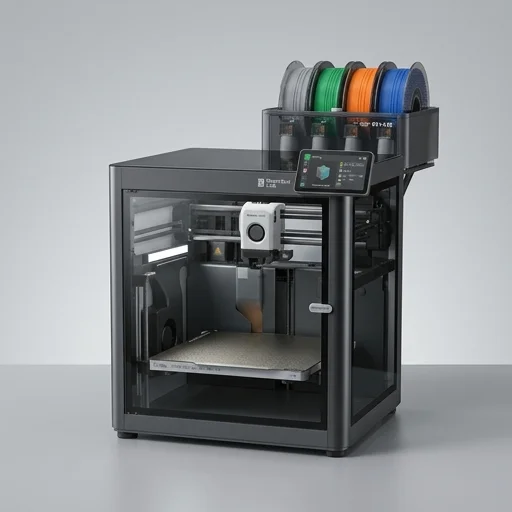
The Bambu Lab X1 Carbon sets a high bar for consumer FDM printing, combining blistering speeds, precise calibration automation, and robust multi-material capability in a well-engineered enclosed package.

Bambu Lab X1 CarbonBench unit

Our verdict

The Bambu Lab X1 Carbon sets a high bar for consumer FDM printing, combining blistering speeds, precise calibration automation, and robust multi-material capability in a well-engineered enclosed package. It's an excellent choice for makers who want minimal tinkering and maximum reliable output, though the cost and semi-closed ecosystem may deter budget-conscious or highly customization-focused users.

Scorecard

Outstanding
4.7
Overall
Print Quality4.9
Speed4.8
Ease of Use4.6
Value4.3
Reliability4.9

Specifications & bench data

FDM Printer
Build Volume
256 x 256 x 256 mm
Max Speed
500 mm/s
Max Nozzle Temp
300 °C
Max Bed Temp
120 °C
Connectivity
Wi-Fi, USB, LAN

Measured on our bench

Benchy time
25m 37s
Dimensional accuracy
±0.11 mm
Noise @ 1m
53 dB
First-layer success
87%

Key features

8
  • Multi-Material System (AMS) supporting up to 4 filaments
  • CoreXY motion system with 500mm/s max speed, 20000mm/s² acceleration
  • LiDAR-assisted first-layer inspection and auto-calibration
  • Active vibration compensation for high-speed printing
  • Enclosed chamber with heated bed up to 120°C
  • Built-in AI camera for print monitoring and error detection (spaghetti/failure detection)
  • Fully automatic bed leveling and flow calibration
  • Hardened steel nozzle for abrasive filaments (CF, glass fiber)

The trade-off

What we liked 6
  • Exceptional print speed without sacrificing quality
  • Excellent out-of-box calibration reduces setup headaches
  • AMS enables reliable multi-color and multi-material printing
  • Sturdy all-metal CoreXY frame with enclosed chamber
  • Great community support and frequent firmware updates
  • Handles advanced materials like PC, PA-CF, PETG-CF well
What we didn't 5
  • Higher upfront cost compared to open-frame printers
  • AMS can occasionally jam or have filament feeding issues
  • Proprietary ecosystem limits some third-party hardware mods
  • Enclosed design makes some maintenance tasks less convenient
  • Bambu Handy/cloud dependency raises privacy concerns for some users

Full review

375 words

The Bambu Lab X1 Carbon represents a significant leap forward in desktop FDM printing, combining speed, precision, and automation into a single enclosed system built for both hobbyists and professionals. At its core is a CoreXY motion architecture paired with high-torque stepper motors, allowing the printer to achieve accelerations and speeds that dramatically outpace traditional desktop machines without sacrificing dimensional accuracy. The enclosed chassis not only improves print quality by maintaining stable internal temperatures but also enables reliable printing of engineering-grade filaments like ABS, ASA, and PC that are prone to warping in open-frame designs. The printer's rigid aluminum extrusion frame and carbon fiber rods contribute to its mechanical stability, letting it maintain print fidelity even at aggressive speeds.

On the bench

What truly sets the X1 Carbon apart is its Active Vibration Compensation system, which uses an onboard accelerometer to measure resonance and automatically adjust motion parameters in real time, virtually eliminating ringing artifacts on prints. The printer also features the Micro Lidar Auto Flow Calibration system, which scans printed calibration patterns to fine-tune extrusion flow without user intervention. A multi-camera setup, including an AI-powered lens mounted inside the chamber, enables first-layer inspection, spaghetti detection, and time-lapse recording, giving users remote monitoring capabilities through the Bambu Handy app. Combined with the Micro Lidar Z-height sensor and full-bed mesh leveling, these features minimize manual calibration, making the machine remarkably accessible for beginners while still satisfying power users who want granular control.

Living with it

The X1 Carbon supports multi-material printing through the optional Automatic Material System, which allows up to four filament spools to be loaded simultaneously for multi-color or multi-material single prints, complete with automatic filament cutting and buffering. Its hardened steel nozzle, capable of handling abrasive filaments like carbon-fiber-reinforced nylon and glass-fiber composites, extends its use case into functional prototyping and end-use part production. With a build volume of 256 x 256 x 256 millimeters, a heated bed capable of reaching high temperatures quickly, and a nozzle that can extend beyond 300 degrees Celsius, the X1 Carbon is engineered to handle a broad spectrum of demanding materials. Its combination of closed-loop motion control, integrated AI monitoring, and streamlined multi-material workflow firmly positions it as one of the most capable all-in-one FDM printers available in the desktop 3D printing category.

What owners say

4 reviews
MTBest printer I've owned
Marcus T. · 2024-02-14
Verified

Switched from a heavily modded Ender 3 and the difference is night and day. Prints finish in a fraction of the time and the AMS makes multi-color prints painless. Calibration is basically automatic.

SKFantastic but AMS needs babysitting
Sarah K. · 2023-11-30
Verified

The printer itself is rock solid and fast. My only gripe is the AMS occasionally misfeeds with certain filament brands. Support was helpful though and firmware updates keep improving it.

DEGreat for engineering parts
DevinPrints · 2024-01-05
Verified

Printing PA-CF and PC parts for functional prototypes has been a breeze. The hardened nozzle and enclosed chamber make a real difference in dimensional accuracy and material compatibility.

ERPricey but worth it
Elena R. · 2023-12-19
Verified

Definitely an investment, but the time saved on calibration and failed prints has paid off. Wish there was more openness for third-party mods, but overall very satisfied.

Keep looking

Related on the bench

Closest matches to the Carbon from the 64 products we have tested.