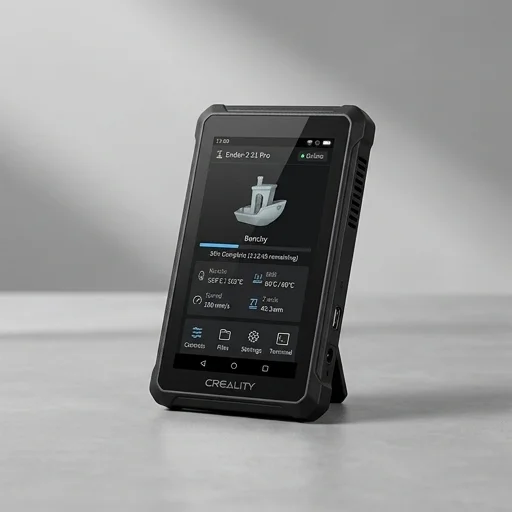
The Creality Sonic Pad is a dedicated control accessory designed to bring the power of Klipper firmware to 3D printers without requiring users to navigate the complexities of manual installation and configuration. Built around a quad-core processor and featuring a 4.3-inch touchscreen display, this standalone unit connects to your existing 3D printer's mainboard, replacing the stock controller's motion planning with Klipper's advanced algorithms. The result is a noticeable transformation in print quality and speed, as Klipper offloads complex calculations to the more powerful processor within the Sonic Pad rather than relying on the often limited microcontroller found in typical printer mainboards.
On the bench
At its core, the Sonic Pad addresses one of the biggest barriers to adopting Klipper: technical complexity. Rather than requiring a Raspberry Pi, command-line configuration, and networking know-how, Creality has packaged the entire experience into a plug-and-play device with an intuitive interface. Users can adjust print settings, monitor progress, calibrate their printer, and access features like input shaping and pressure advance directly through the touchscreen, all without touching a terminal window. This accessibility makes advanced firmware capabilities available to hobbyists who previously found Klipper intimidating, while still offering enough depth for experienced users who want granular control over their printing parameters.
Living with it
Compatibility spans a wide range of printers, including many Creality models like the Ender series and CR-10, as well as numerous third-party machines, making the Sonic Pad a versatile upgrade path for various setups. The device supports Wi-Fi connectivity for remote monitoring and control through Creality's cloud platform, allowing users to check on prints or start new jobs from their smartphone. With its combination of hardware acceleration, simplified Klipper integration, and a polished user interface, the Sonic Pad represents a practical solution for makers seeking faster print speeds, smoother finishes, and reduced ringing artifacts without the steep learning curve traditionally associated with switching to more sophisticated firmware ecosystems.