Skip to content
PrintPlumeTested · Not Guessed

Browse

Printers38Materials11Gear & Upgrades9Software6

By use case

Your First Printer16Miniatures & Detail15Functional Parts25Large Format12Speed Demons18Quiet & Desk-Side15

Site

Home Editor's Top Picks Head-to-Head About
FDM Printer #14 in category 4.4/5

Creality Ender 3 V2

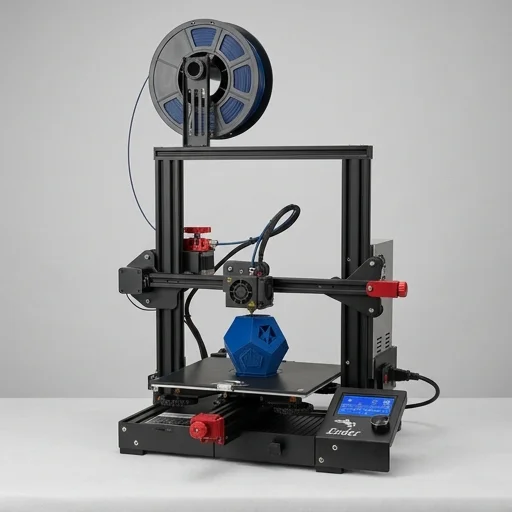
The Creality Ender 3 V2 remains one of the best entry-level FDM printers on the market.

Creality Ender 3 V2Bench unit

Our verdict

The Creality Ender 3 V2 remains one of the best entry-level FDM printers on the market. It strikes an excellent balance between affordability, print quality, and upgradeability, making it ideal for hobbyists and beginners alike. While it lacks some modern conveniences like auto bed leveling, its strong community and vast aftermarket support make it easy to enhance over time.

Scorecard

Very good
4.4
Overall
Print Quality4.3
Speed4.2
Ease of Use4.5
Value4.8
Reliability4.3

Specifications & bench data

FDM Printer
Build Volume
220 x 220 x 250 mm
Layer Resolution
0.1 - 0.4 mm
Max Nozzle Temperature
260°C
Max Bed Temperature
100°C
Print Speed
Up to 180 mm/s (recommended 60-100 mm/s)

Measured on our bench

Benchy time
56m 08s
Dimensional accuracy
±0.20 mm
Noise @ 1m
42 dB
First-layer success
88%

Key features

7
  • Silent motherboard with TMC2208 stepper drivers
  • Carborundum glass bed for better adhesion and heat distribution
  • Resume printing function after power outage
  • 4.3-inch color display with intuitive UI
  • Meanwell branded power supply for fast heating (5 min to 100°C)
  • New UI interface with knob-based navigation
  • Upgraded extruder for smoother filament feeding

The trade-off

What we liked 6
  • Very quiet operation compared to previous Ender models
  • Easy assembly, takes under an hour for beginners
  • Strong community support and abundant upgrade parts
  • Great print quality out of the box after calibration
  • Affordable price point for the feature set
  • Sturdy metal frame construction
What we didn't 6
  • No auto bed leveling out of the box
  • Bowden tube retainer clip can be flimsy
  • Stock bed springs lose tension over time and need frequent releveling
  • No filament runout sensor
  • Limited build volume for larger projects
  • No enclosure, making it sensitive to drafts affecting ABS prints

Full review

344 words

The Creality Ender 3 V2 stands as one of the most recognized names in desktop FDM printing, offering hobbyists and beginners alike a reliable entry point into the world of 3D printing. Building on the legacy of the original Ender 3, this upgraded model features a silent motherboard powered by TMC2208 stepper drivers, dramatically reducing operational noise during long print jobs. The printer boasts a sturdy carborundum glass bed that ensures excellent first-layer adhesion while making it easy to remove finished prints once cooled. Its 220 x 220 x 250mm build volume provides ample space for a wide range of projects, from small figurines to larger functional parts, making it versatile enough for both creative hobbies and practical applications.

On the bench

Assembly of the Ender 3 V2 is straightforward, appealing to newcomers who may be intimidated by more complex machines. The printer ships partially assembled, requiring users to attach the gantry, bed, and a few other components before calibration, a process that typically takes under an hour. The upgraded 4.3-inch color display offers an intuitive interface for navigating print settings, monitoring progress, and adjusting parameters like temperature and print speed on the fly. Additionally, the resume printing function protects against power outages, automatically saving progress so users can continue prints exactly where they left off without wasting filament or time.

Living with it

Beyond its core printing capabilities, the Ender 3 V2 has cultivated a massive community of users and third-party support, making it easy to find upgrades, replacement parts, and troubleshooting advice online. The open-source nature of the machine allows enthusiasts to modify and customize their setup, whether through adding a direct drive extruder, upgrading the hotend for higher temperature filaments, or installing an auto bed-leveling sensor for even more consistent results. Compatible with a variety of filament types including PLA, ABS, PETG, and TPU, the printer accommodates diverse project needs right out of the box. This combination of affordability, reliability, and extensive community backing has helped the Ender 3 V2 remain a top choice for anyone looking to start or expand their journey into FDM 3D printing.

What owners say

5 reviews
MTPerfect first 3D printer
Mike Thornton · 2023-11-14
Verified

Assembled this in about 45 minutes and had my first print running within 2 hours. The silent board is a huge upgrade from the original Ender 3. Bed adhesion is fantastic with the carborundum glass plate.

SJGreat value but needs some tweaks
Sarah Jenkins · 2024-01-22
Verified

Solid printer for the price. Had to relevel the bed a few times in the first weeks. Once dialed in, prints came out clean. Would recommend adding a BLTouch eventually.

DRReliable workhorse
Diego Ramirez · 2023-09-30
Verified

I've had mine running for over a year now with minimal issues. The resume print feature saved me during a couple of power outages. Only gripe is the manual bed leveling process.

ECExcellent for learning 3D printing
Emily Chen · 2024-03-05
Verified

As someone new to 3D printing, this machine taught me a lot about the fundamentals. The community forums have answers to literally every question. Highly recommend for beginners.

JOGood but has quirks
James O'Neil · 2023-12-18
Verified

Print quality is good once calibrated, but the stock springs under the bed wore out faster than expected. Upgraded to silicone leveling knobs which helped a lot. Still a solid budget option.

Keep looking

Related on the bench

Closest matches to the V2 from the 64 products we have tested.