Skip to content
PrintPlumeTested · Not Guessed

Browse

Printers38Materials11Gear & Upgrades9Software6

By use case

Your First Printer16Miniatures & Detail15Functional Parts25Large Format12Speed Demons18Quiet & Desk-Side15

Site

Home Editor's Top Picks Head-to-Head About
FDM Printer #21 in category 4.4/5

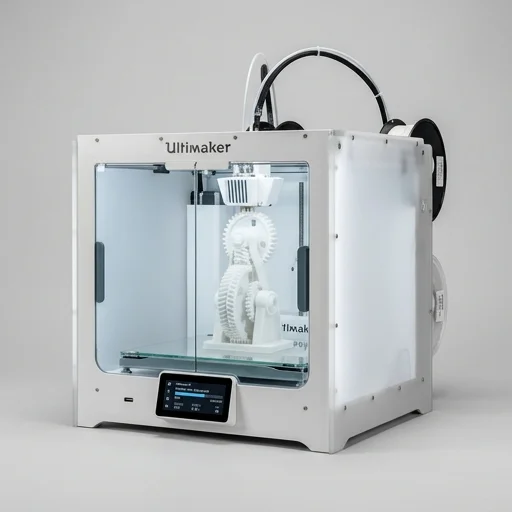
Ultimaker S5

The Ultimaker S5 remains a solid choice for professionals and small businesses needing reliable, repeatable FDM prints with dual-material capability.

Ultimaker S5Bench unit

Our verdict

The Ultimaker S5 remains a solid choice for professionals and small businesses needing reliable, repeatable FDM prints with dual-material capability. While it commands a premium price and isn't the fastest printer on the market, its build quality, software ecosystem, and consistent output make it a dependable workhorse for prototyping and low-volume production.

Scorecard

Very good
4.4
Overall
Print Quality4.6
Speed4.1
Ease of Use4.6
Value4.1
Reliability4.6

Specifications & bench data

FDM Printer
Build Volume
330 x 240 x 300 mm
Nozzle Configuration
Dual extrusion print head
Layer Resolution
20-600 microns
Max Bed Temperature
140°C
Connectivity
Wi-Fi, Ethernet, USB

Measured on our bench

Benchy time
61m 49s
Dimensional accuracy
±0.14 mm
Noise @ 1m
55 dB
First-layer success
96%

Key features

8
  • Dual extrusion print head with interchangeable print cores
  • Build volume of 330 x 240 x 300 mm
  • Active bed leveling with automatic calibration
  • Heated glass build plate up to 140°C
  • Compatible with Ultimaker Cura software and Digital Factory cloud platform
  • Air manager filter accessory for enclosed printing
  • NFC material recognition for Ultimaker filament spools
  • Touchscreen interface with intuitive UI

The trade-off

What we liked 6
  • Excellent print reliability and consistent results
  • Large build volume for a professional desktop printer
  • Dual extrusion enables complex geometries and support materials
  • Strong software ecosystem with Cura integration
  • Sturdy industrial build quality
  • Good community and enterprise support
What we didn't 5
  • High price point compared to hobbyist printers
  • Proprietary print cores can be costly to replace
  • No fully enclosed chamber by default (requires Air Manager add-on)
  • Print speeds are moderate compared to newer high-speed FDM machines
  • Limited to open-source filament profiles for best results with Cura

Full review

366 words

The Ultimaker S5 stands as a professional-grade fused deposition modeling printer designed for engineers, designers, and manufacturers who require reliable, high-quality output for functional prototyping and end-use parts. With a generous build volume of 330 x 240 x 300 mm, this dual-extrusion FDM printer accommodates larger projects and complex geometries without compromising precision. The printer's fully enclosed chamber ensures consistent thermal conditions throughout the print process, which is particularly beneficial when working with advanced engineering materials that demand stable temperatures to prevent warping and layer delamination. Its robust construction reflects Ultimaker's commitment to industrial reliability, making it a workhorse for teams that need consistent, repeatable results across long production runs.

On the bench

What sets the Ultimaker S5 apart is its dual extrusion system, which allows users to print with a primary material alongside a dedicated support material such as PVA or Breakaway. This capability is invaluable for producing intricate designs with overhangs, internal cavities, or complex assemblies that would otherwise be impossible to print as a single piece. The printer supports an extensive range of materials, including engineering-grade thermoplastics like nylon, polycarbate, and various composite filaments, giving users the flexibility to match material properties to their specific application needs. The active bed leveling system and swappable print cores further streamline the printing experience, reducing setup time and minimizing the need for manual calibration between prints. These features collectively contribute to a smoother workflow, especially in professional settings where downtime translates directly into lost productivity.

Living with it

Connectivity and software integration round out the Ultimaker S5's appeal as a comprehensive 3D printing solution. The machine works seamlessly with Ultimaker Cura, the company's widely adopted slicing software, which offers extensive control over print settings and material profiles optimized for the S5's hardware. Users can monitor print jobs remotely through Wi-Fi or Ethernet connectivity, with a built-in camera providing visual confirmation of print progress from anywhere. The touchscreen interface simplifies job management directly at the machine, while the printer's compatibility with Ultimaker's Marketplace and Digital Factory platform allows organizations to scale their additive manufacturing operations efficiently. For businesses seeking a dependable bridge between rapid prototyping and low-volume production, the Ultimaker S5 delivers the accuracy, material versatility, and operational consistency that professional applications demand.

What owners say

4 reviews
MTReliable workhorse for our design studio
Marcus T. · 2023-11-14
Verified

We've run this machine almost daily for two years with minimal maintenance. Dual extrusion with PVA supports lets us print complex geometries that would be impossible otherwise. Worth the investment.

SKGreat quality, but pricey consumables
Sarah K. · 2024-01-22
Verified

Print quality is excellent and repeatable. My only gripe is the cost of replacement print cores and the price of NFC-tagged filament spools. Still, the reliability makes up for it.

DRSolid choice for engineering prototypes
Dev R. · 2023-09-05
Verified

Great build volume and the active leveling saves a lot of setup time. Wish it printed faster, but accuracy is more important for our prototypes so it's a fair tradeoff.

EPExcellent support and software integration
Elena P. · 2024-03-10
Verified

Cura integration is seamless and the Digital Factory dashboard makes managing multiple printers across our office simple. Highly recommend for teams scaling up production.

Keep looking

Related on the bench

Closest matches to the S5 from the 64 products we have tested.